🔄 Updated May 7, 2026
Google removed the manual dispute button from LSA in mid-2024.
It is not coming back. The replacement is an automated credit system powered by Google’s AI, and your main lever now is a feedback tool called “Rate this lead.”
This guide covers:
- What changed and why
- What your lead statuses actually mean
- The exact steps to request a credit today
- Which leads still qualify (and which ones don’t)
- How to stop bad leads before they reach you
Also Read: LSA vs GBP: Which is better for you in 2026?
What changed in 2024?
Before July 2024, disputing a lead was simple.
You found it in the dashboard, clicked “Dispute,” chose a reason (spam, wrong number, out of service area), and submitted. Google reviewed it within 48 hours and credited your account if the dispute held up.
That system is gone.
Why did Google remove the dispute button from the LSA dashboard?
Google’s data showed two problems with the manual process.
First, most advertisers never used it. Second, dispute outcomes were inconsistent and didn’t always reflect actual lead quality. The stated goal of the new system is to catch bad leads for every advertiser automatically, not just the ones who knew to file disputes.
What replaced it?
Starting in July 2024, Google rolled out an AI-powered automated credit system.
Machine learning models review every charged lead. If the lead is flagged as invalid, a credit is automatically applied to your account. You do not request it. Google’s algorithm decides.
Credits appear within 30 days of the lead date. The original charge still shows on your invoice after a credit is applied. That is normal.
Two lead types that used to be easy disputes no longer qualify for any credit:
- Calls about services you don’t offer (“job type not serviced”)
- Calls from outside your service area (“geo not serviced”)
Under the old system, these were the most common disputes. Under the new system, they are your responsibility to prevent through profile setup. See the prevention section below.
Your lead statuses, explained
When you open the Leads tab in your dashboard, every lead shows one of four statuses. Here is what each one means and whether you need to act.
| Status | What it means | Action needed? |
|---|---|---|
| Not charged | Google caught a low-quality or duplicate lead before billing you | None |
| Charged | Google reviewed the lead and billed you | Yes, if you believe it’s invalid, use the feedback tool |
| In review | Google’s system is still evaluating the lead | Wait, a credit may be applied automatically |
| Credited | You were charged, then refunded | None, the system worked |
Also Read: Economics of LSA vs Local SEO For Law Firms in 2026
How to get a credit for a bad LSA lead today?
The “Rate this lead” tool is your only direct lever under the new system. Here is how to use it correctly.
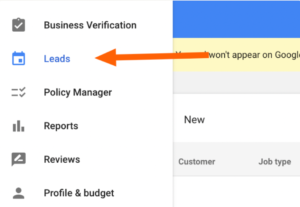
Step 1: Open your LSA dashboard and go to the Leads tab
Sign in to your local service ads account and navigate to the Leads section.
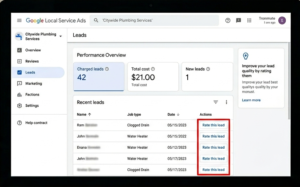
Step 2: Find the charged lead and open the detail view
Click on the lead. Look for the “Rate this lead” button in the upper right corner of the screen.
Step 3: Select “Very dissatisfied”
This is the critical step. “Somewhat dissatisfied” sends feedback but rarely triggers a credit review. Only “Very dissatisfied” has a meaningful chance of resulting in a credit.
Step 4: Choose the most specific reason available
Options in the dropdown include: spam call, wrong number, duplicate lead, solicitation call, and geographic mismatch. Pick the one that most precisely describes the actual issue. Vague or generic selections are much less likely to trigger a credit.
Step 5: Submit within 30 days of the lead date
This is a hard deadline. Leads rated after the 30-day window are not eligible for credits, regardless of the reason.
What to realistically expect
Based on managed account data, the feedback-to-credit conversion rate runs roughly 15 to 25 percent. That means for every four to six bad leads you flag, you can expect to recover the cost of about one.
That is significantly lower than the 50+ percent success rate advertisers saw with manual disputes. But there is a secondary benefit: consistent lead ratings train Google’s algorithm over time.
Advertisers who rate every lead report better lead quality within 60 to 90 days compared to those who ignore the feedback tool.
What still qualifies for a credit
These lead types are eligible under the automated system:
- Spam and robocalls. Automated dialers, telemarketing, robocalls.
- Wrong number. The caller was trying to reach a different business.
- Duplicate lead. The same person contacted you more than once, and you were charged multiple times.
- Solicitation calls. Someone calling to sell you something, not hire you.
What no longer qualifies
These two types were removed when the new system launched:
- Calls about services you don’t offer
- Calls from outside your service area
If these are happening regularly, the fix is profile configuration, not credit recovery.
The next section covers this.
How to stop bad leads before they reach you?
Profile accuracy is now the primary line of defense. Under the old system, disputes were the backstop. Under the new system, your profile setup is the backstop.
Audit your service categories
LSA groups services into broad buckets. If your profile has every available job type enabled, you will get calls for services you don’t offer and have no way to recover the cost.
Go through every enabled job type and remove anything you don’t actively service. It feels counterintuitive to narrow your categories, but every job type you leave on is a potential charge you cannot dispute.
Narrow your service area
Set your service area to only the cities and zip codes you actually serve. If you are getting leads from 40 minutes away, your area is too broad.
Be specific. List individual cities and zip codes rather than drawing a wide radius. Paying for leads you can’t convert is worse than missing a few edge-case inquiries.
Sync your LSA profile with your Google Business Profile
Since November 2024, Google requires LSA and GBP to be linked and consistent. Differences in phone numbers, business name, or service area between the two profiles can produce poorly targeted leads. Audit both side by side and make sure every field matches.
Answer calls during business hours
Responsiveness is one of Google’s most heavily weighted LSA ranking signals. Businesses that answer promptly rank higher and attract higher-intent leads.
If calls are going to voicemail regularly during business hours, your ranking and lead quality will both decline.
If you can’t answer every call in person, set up an automated text-back for missed calls. It protects your responsiveness signals even when you can’t pick up.
Build your review count
Review count and average rating are the two highest-weighted ranking signals in LSA, according to Google. Better ranking means better positioning, which means higher-intent leads from people who are ready to hire.
Businesses with 50 or more reviews and a 4.5-star average consistently outperform those with fewer reviews across lead quality metrics. If your review count is below 30, that is the single highest-leverage improvement available to you right now.
Rate good leads too, not just bad ones
Most advertisers only touch the feedback tool when a lead goes wrong. That leaves a significant signal on the table.
When you rate a lead as “Very satisfied” and confirm it resulted in a booked job, you are showing Google’s algorithm what a good lead looks like for your business. Over time, that signal steers the system toward sending more of the same.
Advertisers who rate every lead, both good and bad, report measurably better lead quality within 60 to 90 days compared to those who only rate bad leads or ignore the tool entirely.
A practical habit: Set a recurring 15-minute block once a week to review and rate all leads from the previous seven days. The time investment is low and the cumulative effect on lead quality compounds over months.
The bottom line
The 2024 change shifted where your leverage sits.
The old system rewarded reaction. You could have a rough profile, receive bad leads, and recover a meaningful portion of costs through disputes. The new system does not work that way.
Profile accuracy, a narrow service area, a strong review count, and consistent lead feedback are now the variables that determine whether you pay for leads that never convert. The dispute button is gone. The control it gave you moved upstream, into your profile settings and your weekly rating habits.
Dispute less. Prevent more.
Frequently asked questions
Can you still dispute LSA leads in 2026?
Not manually. Google replaced the manual dispute system with automated crediting in mid-2024. You can influence potential credits by rating leads as “Very dissatisfied” with a specific reason, but there is no longer a dispute button or a formal review process you can initiate yourself.
How long do LSA credits take to appear?
Credits are typically applied to your account balance within 30 days of the lead date. The original charge still appears on your invoice after the credit is applied. This is expected behavior, not a billing error.
What leads qualify for automatic credits?
Spam calls, robocalls, wrong numbers, duplicate leads, and solicitation calls. Job type not serviced and geo not serviced no longer qualify.
What if Google doesn’t credit a lead I think is invalid?
There is no formal appeal process. Your best options are: rate the lead as “Very dissatisfied” with the most specific reason available, review your profile configuration to prevent similar leads going forward, and contact Google support directly for cases involving significant charges. Support access is limited but available for billing disputes.
Does this apply to all industries?
Lead credits are not available for healthcare verticals, tax specialists, or advertisers in EMEA regions. For all other US-based advertisers, the automated credit system applies.
How many credits should I realistically expect?
Roughly 15 to 25 percent of flagged bad leads result in a credit. For every four to six leads you rate as “Very dissatisfied,” expect to recover the cost of approximately one. Consistent feedback also improves future lead quality over time, which is often more valuable than the individual credits themselves.

Rohan Hosmani is the founder and Lead SEO/Local SEO strategist at Jumping Ranks. Rohan has more than 5 years of experience as an SEO working with companies based in UK, USA & UAE. Rohan has worked with publishers, B2B companies, Law firms, Service area businesses, and Healthcare businesses. Rohan believes in using SEO as a revenue-increasing channel by using data and creative solutions.